How to Format a Screenplay: Every Element on the Page
The real screenplay format spec. Courier 12pt, exact margins and indents, scene headings, action lines, parentheticals, transitions and the title page.
How to Format a Screenplay: Every Element on the Page
Screenplay format looks strict because it is. Readers judge a script in the first page, and a format mistake tells them you're new. The good news: there are only a handful of elements, and each has one job.
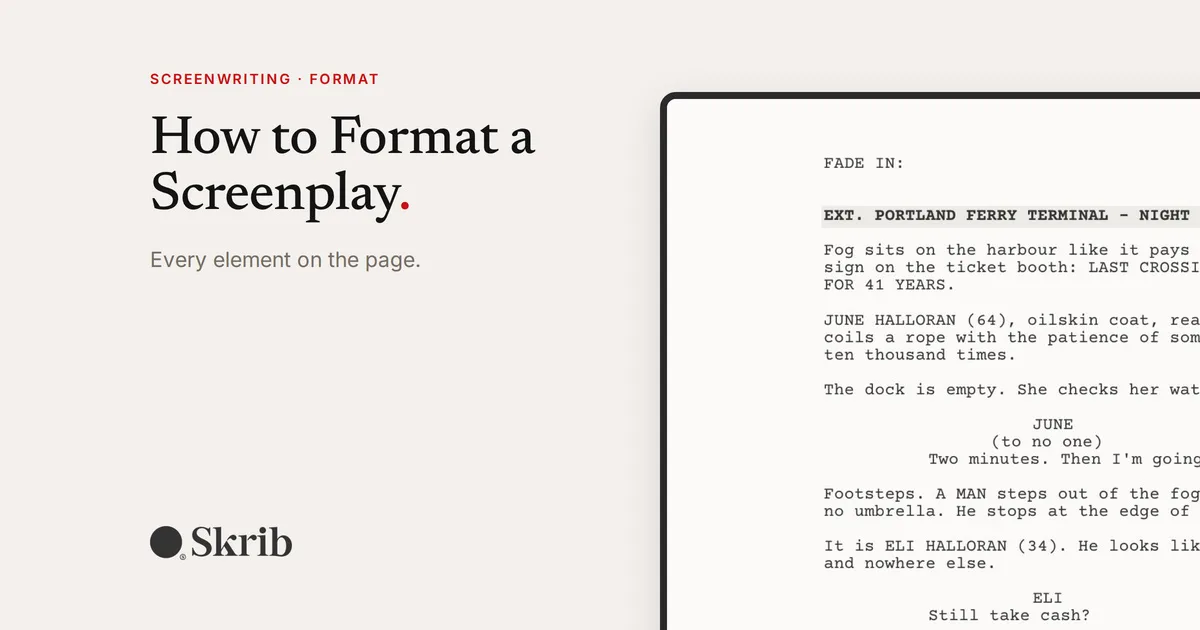
This guide covers every element, with a real page from our short screenplay Last Ferry, written in Skrib.

The page
- Font: Courier, 12 point.
- Margins: about 1.5 inches on the left (for binding), 1 inch on the right, top and bottom.
- Page numbers: top right, from page 2.
This is why one page roughly equals one minute of screen time.
Scene heading (slugline)
A scene heading tells us where and when: EXT. PORTLAND FERRY TERMINAL - NIGHT. INT. or EXT., then the location, then the time. All caps.
Action lines
Present tense, what we see and hear. Keep paragraphs to three or four lines. "Fog sits on the harbour like it pays rent."
Character introductions
The first time a character appears, write their name in caps with an age and one telling detail: "JUNE HALLORAN (64), oilskin coat, reading glasses on a cord."
Character name, dialogue and parentheticals
The character name sits centred above the dialogue. Dialogue runs in a narrower column. A parenthetical under the name gives a short direction, like (to no one). Use them rarely.
Transitions
Right-aligned, like CUT TO: or FADE OUT. Modern scripts use them sparingly.
Do it in Skrib: a Screenplay project knows the elements. Each line has an element type, like Scene Heading, Action, Character or Dialogue, and the formatting happens for you.
The title page
The title, centred, then "Written by" and your name. Contact details bottom left. Nothing else: no dates, no drafts, no pictures.


FAQ
Do I need Final Draft to format a screenplay? No. Any tool that follows the standard format works.
Can I use bold or italics? Sparingly. Some writers bold scene headings.
Format your screenplay in Skrib
Copy the Screenplay Format Board, or start a Screenplay project and let Skrib handle the format.
Copy the Screenplay Format Board
New to Skrib? Create your account.