Twine vs. Ink: Prototyping Branching Narratives | Skrib
Compare Twine, Ink and Yarn Spinner for narrative prototyping: what each is good at, the migration cost, a hybrid workflow and when not to prototype at all.
The question gets asked as a preference. Twine or Ink - visual or textual, node map or script? Pick the one that suits how you think.
That framing produces a specific and expensive mistake, which is choosing one tool to carry a project from first sketch to shipped build.
They aren’t competitors. They answer different questions at different stages.
Twine answers does this structure work? Ink answers can this ship? Those are separate jobs, and the practitioners who use both treat them that way - prototype fast to socialise the beats, then translate once the spine has hardened.
You’re not choosing a tool. You’re choosing which question you’re answering right now.
Tool facts below were checked in August 2026. This category moves - verify against official documentation before committing a project.
Our video game writer’s handbook covers the craft these tools serve.
What are narrative prototyping tools?
Narrative prototyping tools are lightweight environments for building and playing branching stories without a game engine - letting a writer test structure, pacing and choice before any production work exists. They’re distinct from production dialogue systems, which need engine integration, typed variables, audio references and localisation support.
Some tools cross the line. Most don’t, and expecting them to is the root of most tooling regret.
What prototyping is actually for
Not to build the thing. To answer a question you can’t answer on paper.
The questions worth prototyping:
Does this branch structure hold, or does it explode four beats in?
Is this conversation too deep to be worth authoring?
Does the choice feel meaningful when actually played rather than read?
Can a designer follow it without the writer narrating?
How long does this take to play? Almost always longer than it reads.
The discipline that makes prototyping work: build to answer one question, then throw it away.
A prototype you’ve become precious about has quietly become production, at which point you’re shipping on a tool chosen for speed rather than for the pipeline. That transition is rarely decided - it just happens, and the cost arrives eighteen months later.
The craft of branch construction itself is tool-agnostic and covered separately in writing branching dialogue trees. This article is about where to do it.
The tools compared
Current as of August 2026.
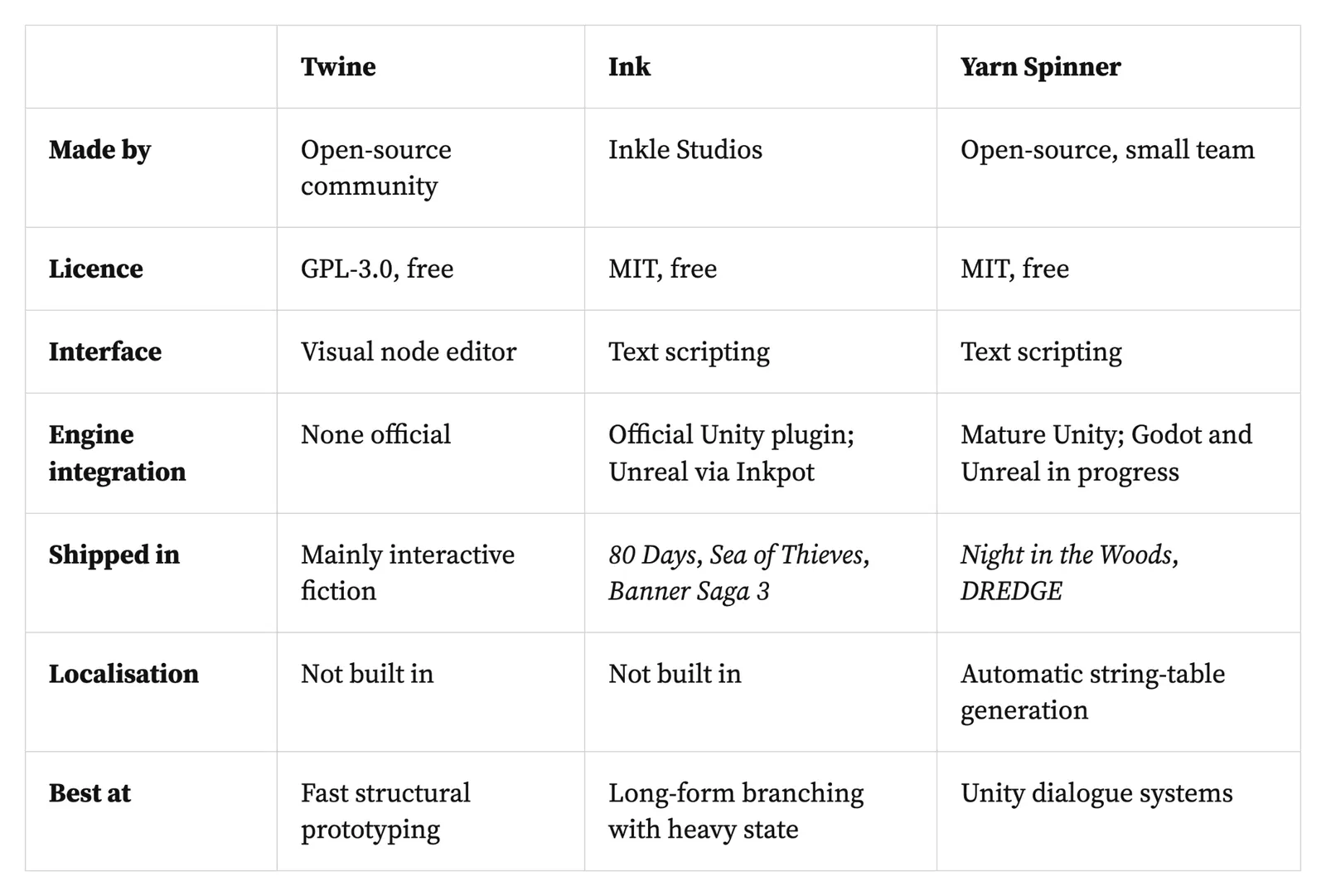
Read the integration row first. It’s the one that determines whether a tool can follow you into production, and it’s the row people check last.
Twine
The fastest route from nothing to a playable branching prototype. Passage-based, visual, free, and it compiles to standalone HTML - which means you can send a playable link to a designer or a director within an hour of starting.
What it’s genuinely excellent at: proving a structure works, socialising a concept, game jams, teaching, and interactive fiction as a finished form.
Two warnings that matter more than they sound.
It has no official engine integration. Getting Twine output into Unity, Unreal or Godot means custom JSON parsing through third-party converters. That’s viable for a jam and unwise as a production plan.
Story format choice is a fork in the road. Twine ships multiple story formats - Harlowe as the default, SugarCube as the most common alternative - and their syntax is incompatible. Choosing one and later needing the other means rewriting your logic. Decide deliberately in the first hour rather than accepting the default and discovering the constraint at scale.
The structural mismatch worth knowing: the passage model doesn’t map cleanly onto game dialogue that needs speaker assignments, audio references and typed variables. That’s not a flaw - it’s a tool built for a different job.
Ink
An open-source scripting language built specifically for branching narrative, from the studio behind 80 Days, Heaven’s Vault and Sorcery!. MIT-licensed and free.
Why writers take to it: the syntax is markdown-like and readable, which is unusual for a scripting language and deliberate. Writers who resist code generally get comfortable in Ink faster than expected.
Why it scales where Twine doesn’t: knots are modular, so content can be reused and restructured late without unpicking a node graph. As state complexity rises - reputation, callbacks, conditions accumulating across acts - Ink’s determinism becomes the reason to have chosen it.
Integration. An official Unity plugin is well-supported. Unreal is served by Inkpot. Community integrations exist elsewhere.
The trade-offs, stated plainly:
No visual editor. Inky provides an editor with live preview, but there’s no drag-to-edit node map. Writers who think spatially find the ramp real.
Development is measured. Inkle is a small team, roughly four people, and Ink’s pace reflects that. Stability rather than rapid feature growth.
It’s the writing layer only. Ink handles narrative logic; everything around it - VO, UI, saves - is your engine’s job.
Who it suits: writers comfortable with text-based authoring, and teams wanting a lightweight, proven narrative layer that will survive the whole project.
Yarn Spinner and the rest
Yarn Spinner is worth knowing even if you never use it. Twine-inspired syntax, MIT-licensed, built primarily for Unity, shipped in Night in the Woods and DREDGE.
Its distinguishing feature is localisation: automatic string-table generation, built in. If you’re shipping in a dozen languages, that’s not a minor convenience - it’s a category of pain removed, and the reasons are covered in localization-friendly writing.
Its constraint is engine coverage. Unity integration is mature and production-proven; Godot and Unreal support has been in progress with completion expected during 2026. Verify current status before planning around it.
Also in the category: Ren’Py remains the default for visual novels and is mature and purpose-built. Inklewriter sits at the simplest end for pure interactive fiction. Various commercial narrative tools exist with visual editors and heavier feature sets, which suit teams wanting one system for prototype and production - at the cost of the portability that comes with open formats.
The migration cost
The thing nobody budgets for.
Translating a prototype into production tooling is real work, and it’s proportional to how much you built rather than how much you learned. A structural prototype of twenty passages translates in an afternoon. A forty-hour narrative built in Twine because it started as a test does not.
Three habits keep the cost low:
Prototype narrow and deep. One conversation at full complexity teaches more than thirty at low fidelity, and costs almost nothing to abandon.
Keep source in readable text. Formats that produce diffable text files can be version-controlled and reviewed; binary or opaque formats can’t, and that matters the moment more than one person is involved.
Set the switch point in advance. Agree, before starting, what condition triggers the move to production tooling. Without that, nobody ever decides - the prototype simply becomes the game.
The hybrid workflow
The pattern most experienced teams converge on.
Prototype in Twine. Fast, visual, playable by anyone. Use it to test structures, get buy-in and demonstrate a conversation to people who won’t read a document.
Harden in Ink. Once the spine is agreed, rebuild in the tool that will carry it - modular, diffable, integrated, and able to hold the state a long game accumulates.
Why this beats picking one: it front-loads speed where speed matters and rigour where rigour matters, and it reduces training pressure, since only the writers going into production need Ink fluency.
Two practical notes. Pair a writer with an experienced Ink scripter for the first couple of scenes rather than handing over documentation - the ramp is mostly pattern-learning and it goes fast with a partner. And rebuild rather than convert; automated translation between these tools produces something nobody wants to maintain.
When not to prototype
When the scope is small. A conversation with four options doesn’t need a playable test.
When the studio pipeline already exists. If there’s a proprietary editor everyone uses, prototyping elsewhere adds a translation step and teaches you about a tool you won’t ship on.
When it’s procrastination. Prototyping is enjoyable and legible as progress. A month of prototypes and no draft is a recognisable failure state.
When the question is craft, not structure. Whether a line lands is answered by reading it aloud, not by building a branch around it.
Where it goes wrong
Prototype becomes production. No decision, just drift.
Story format chosen by default. Discovered at scale, when switching means a rewrite.
Integration checked last. A finished prototype on a tool with no path into the engine.
Building broad instead of deep. Thirty shallow branches proving nothing.
Converting instead of rebuilding. Automated output nobody can maintain.
Tool chosen for the writer’s comfort alone, ignoring who has to maintain it for four years.
No agreed switch point. The single most common version of all of the above.
Where the writing happens before any of this
Prototyping tools are for structure. They’re poor places to write - Twine’s passage boxes and Ink’s script files are both optimised for logic rather than prose, and most writers draft elsewhere and paste in.
Skrib is that elsewhere. On the Plan, a conversation’s shape, its conditions and the questions you’re prototyping to answer sit as cards, with the Draft open beside it for the actual lines. The Library keeps every version searchable across a project, and content moves in and out as .md, .csv, .docx and .xlsx.
Being unambiguous, because this is the article where it matters most: Skrib is not a prototyping tool. It doesn’t compile, branch, execute conditions or produce anything playable, and it is not an alternative to Twine, Ink, Yarn Spinner or your studio’s editor. It’s where the thinking and the prose live before they reach one. You can start free.
Frequently asked questions
Should I use Twine or Ink? Both, at different stages. Twine gets you to a playable branching prototype fastest and is ideal for testing structure and showing people a concept. Ink scales into production with modular knots, engine integration and the determinism a long game needs. Many teams prototype in Twine and rebuild in Ink once the structure is agreed.
Is Twine suitable for a commercial game? For interactive fiction shipped as a web or standalone build, yes. As a production dialogue system for Unity, Unreal or Godot, no - it has no official engine integration, and getting content across means custom parsing through third-party converters.
Is Ink hard for writers who don’t code? Less than expected. The syntax is deliberately markdown-like and readable, and most writers become comfortable within a couple of scenes - particularly if paired with an experienced scripter rather than handed documentation.
What about Yarn Spinner? A strong option if you’re on Unity, with Twine-inspired syntax and built-in localisation through automatic string-table generation. Its Godot and Unreal integrations have been in progress with completion expected during 2026, so confirm current status before planning around them.
Do these tools cost anything? No. Twine is GPL-3.0 licensed, and Ink and Yarn Spinner are both MIT-licensed. All three are free and open source, which is part of why they’re the default starting points.
How much should you prototype before writing properly? Enough to answer a specific question, then stop. One conversation at full complexity teaches more than thirty shallow ones, and a prototype nobody is willing to discard has already become the production version by accident.